Understanding QLoRA(Quantized Low-Rank Adaptatio)
A Hands-On Demonstration
Published
•2 min readQLoRA (Quantized Low-Rank Adaptation) changes the game — it allows fine-tuning 65B-parameter models on a single 48 GB GPU by combining 4-bit quantization with LoRA adapters.
In this post, we’ll break down how QLoRA works, show a clean PyTorch implementation, and explain why it’s now the standard approach for efficient large-model fine-tuning.
Code: Github
What is QLoRA?
----------------------------------------------------------------------

QLoRA combines two powerful techniques:
1. 4-bit quantization of pretrained model weights (8x memory reduction)
2. LoRA adapters for parameter-efficient fine-tuning

Key Innovation:
- Base model weights are quantized to 4-bit and frozen
- Only small LoRA adapters (A and B matrices) are trained in float32
- This allows fine-tuning 65B parameter models on a single consumer GPU!

The magic: Despite aggressive 4-bit quantization, QLoRA maintains accuracy
comparable to full 16-bit fine-tuning by learning LoRA adapters that
compensate for quantization errors.


Configuration:
  • Matrix size:          8 × 8
  • LoRA rank:            2
  • Base quantization:    4-bit (16 levels)
  • LoRA precision:       32-bit float

======================================================================
STEP 1: Creating pretrained weights
----------------------------------------------------------------------
✓ Created 8×8 weight matrix

======================================================================
STEP 2: Initializing QLoRA layer
----------------------------------------------------------------------
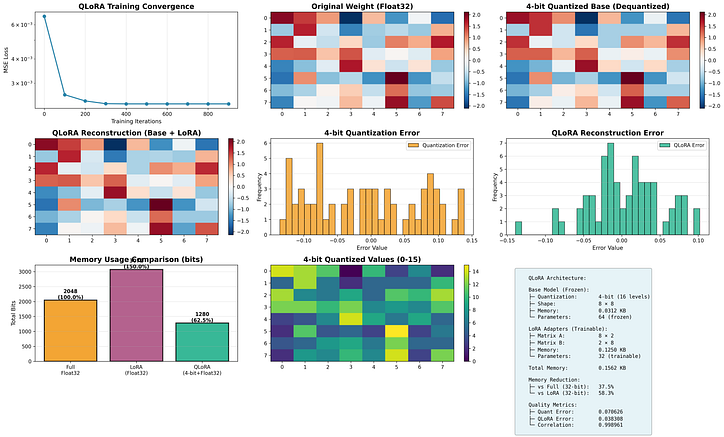
✓ Quantized base to 4-bit: torch.Size([8, 8])
✓ LoRA Matrix A: torch.Size([8, 2])
✓ LoRA Matrix B: torch.Size([2, 8])

Memory breakdown:
  • Base (4-bit):         0.0312 KB
  • LoRA (32-bit):        0.1250 KB
  • Total:                0.1562 KB
Press enter or click to view image in full size