Understanding LoRA (Low-Rank Adaptation)
A Hands-On Demonstration
Updated
•2 min readLoRA (Low-Rank Adaptation) offers a smarter way — it adapts large models with only a tiny fraction of trainable parameters.
In this post, we’ll explore how LoRA works, how to implement it from scratch in PyTorch, and what makes it so powerful for modern AI workloads.
Code:Github
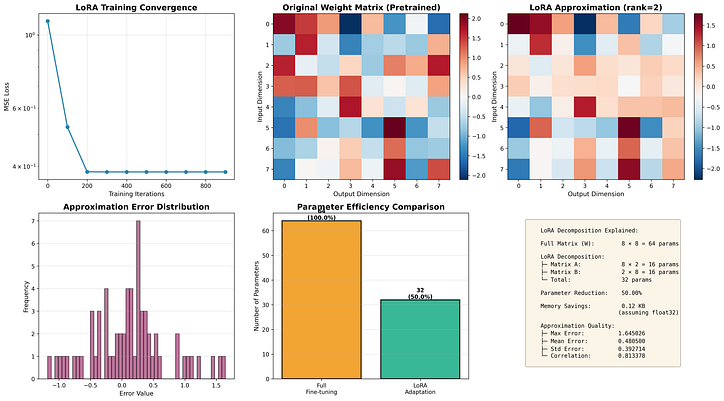
Full fine-tuning: 8×8=64
8×8=64 parameters
LoRA fine-tuning: 2×(8+8)=32
2×(8+8)=32 parameters
→ 50% reduction with minimal accuracy loss.
What is LoRA?
----------------------------------------------------------------------

LoRA is a parameter-efficient fine-tuning technique that freezes pretrained
model weights and injects trainable low-rank decomposition matrices into
each layer of the transformer architecture.

Instead of updating all parameters in a weight matrix W (d×k), LoRA learns
a low-rank update: ΔW = B @ A, where:
    • A is a (d × r) matrix
    • B is a (r × k) matrix
    • r << min(d, k) is the rank

This dramatically reduces trainable parameters while maintaining model quality.


Configuration:
  • Input dimension (d):  8
  • Output dimension (k): 8
  • LoRA rank (r):        2

======================================================================
STEP 1: Creating simulated pretrained weights
----------------------------------------------------------------------
✓ Created 8×8 weight matrix

======================================================================
STEP 2: Initializing LoRA layer
----------------------------------------------------------------------
✓ Matrix A shape: torch.Size([8, 2]) (input → bottleneck)
✓ Matrix B shape: torch.Size([2, 8]) (bottleneck → output)
✓ Total LoRA parameters: 32

======================================================================
STEP 3: Training LoRA to approximate weight matrix
----------------------------------------------------------------------
Training LoRA approximation...
Iteration    Loss         Improvement
--------------------------------------------------
0            1.101851     baseline
100          0.526479      52.22%
200          0.385436      65.02%
300          0.385112      65.05%
400          0.385105      65.05%
500          0.385104      65.05%
600          0.385104      65.05%
700          0.385104      65.05%
800          0.385104      65.05%
900          0.385104      65.05%
Press enter or click to view image in full size